A setting holds more about a family than almost anyone outside it. A child’s allergies and medicines, who may and may not collect them, their development, their photos, sometimes a safeguarding concern or a court order. A parent’s address, phone number and bank details.
Most problems with that information aren’t hackers. They are an email sent to the wrong parent, a register printout left on a bus, a group photo on social media with a child whose family said no, a tablet with no screen lock. Each one is a breach of a family’s trust, and some are breaches of the law.
UK GDPR and the Data Protection Act 2018 apply across England, Scotland, Wales and Northern Ireland, and the Information Commissioner’s Office (ICO) regulates them in all four. This guide is not legal advice. Use the ICO’s guidance, and ask a data protection adviser or solicitor about your own position. It covers:
- knowing what you hold, and why;
- a privacy notice families can read;
- keeping sensitive records to the people who need them;
- photos and videos;
- devices, logins and the software you use;
- sharing safely, and sharing when a child needs protecting;
- requests for information;
- how long to keep records;
- what to do when something goes wrong.
1. Write down what you hold, and why
You can’t protect information you don’t know you have. Start with a list:
- children: names, dates of birth, addresses, health, allergies, diets, additional needs, observations, photos, attendance, accidents, safeguarding records;
- parents and carers: contact details, who may collect, payment details, funding eligibility;
- staff: contracts, vetting checks, training, pay, sickness;
- others: families on your waiting list, job applicants, visitors.
For each, write down where it is kept (an app, paper files, email, a spreadsheet, a phone), who can see it, who you share it with and how long you keep it. That is your record of processing. UK GDPR expects organisations to keep one. There is a lighter rule for organisations with fewer than 250 staff, but it doesn’t cover processing that is regular or includes health information, and a setting’s almost always is. The ICO publishes a template.
You also need a lawful basis for each thing you do with personal data. UK GDPR lists six. In plain words, the ones settings use most are:
- contract: you need it to provide the place you agreed with the family, such as their sessions and bills;
- legal obligation: the law or your framework says you must keep it, such as registers and accident records;
- vital interests: someone’s life is at risk, such as passing on a child’s allergy to paramedics;
- legitimate interests: a reasonable use the family would expect, which you have weighed against their interests;
- consent: a genuine choice the family can say no to and change later, such as photos on your website.
Settings funded or run by a local authority may also rely on public task. Health and other special category data needs an extra condition as well (see section 3).
Consent isn’t the answer to everything. If you would keep the record anyway, asking for consent misleads the family, because they can withdraw it. Use consent for real choices.
Most organisations that process personal data must also pay a data protection fee to the ICO, unless they are exempt. That includes many childminders. The ICO’s online self-assessment tells you whether you need to pay. The fee is renewed every year.
What to do: Spend an afternoon on the list with your manager or deputy. Use the ICO’s lawful basis guidance to pick a basis for each use, and write it down. Check the ICO self-assessment, and put the fee’s renewal date in your diary. Review the list once a year, and whenever you start doing something new.
2. Give families a privacy notice they can read
UK GDPR gives people the right to be told what you do with their information. That is what a privacy notice is for. It should say, in plain words:
- who you are, and how to contact you about data protection;
- what information you collect about children and their families;
- why you collect it, and your lawful basis for each use;
- who you share it with, such as schools, the local authority and the software you use;
- how long you keep it;
- the rights families have, including to see what you hold;
- how to complain to you, and their right to complain to the ICO.
Write it for a parent reading it on a phone. Short headings, short sentences, no legal terms you don’t explain. A summary at the top, with the detail below, helps.
Staff and job applicants need their own notices, because you hold different things about them, for different reasons.
What to do: Read your privacy notice against your list from section 1. Anything you do that isn’t in the notice goes in. Give it to every family at enrolment, put it on your website, and tell families when it changes.
3. Keep sensitive records to the people who need them
Some information needs more care. Under UK GDPR, special category data includes health, racial or ethnic origin, religion and biometric data. For a setting, that means allergies, medicines, care plans, additional needs and SEND, and often parts of the registration form. Safeguarding records aren’t named as a category, but they are among the most sensitive records you hold, and they often contain special category data.
The rule is need-to-know. Staff in a room need each child’s allergies and care plan. Not everyone needs the safeguarding file: your designated safeguarding lead and managers do. Bank and agency staff, students and volunteers need less again. In England, the EYFS statutory framework says confidential information and records about staff and children must be held securely and only be available to those who have a right or professional need to see them.
Paper needs the same care:
- keep files in a locked cabinet, and know who has the keys;
- don’t leave registers, forms or notes on desks or in the hall;
- think about lists on walls. Staff need to see allergies at mealtimes, but a list with names and photos where visitors can read it says more than it needs to;
- shred paper you no longer need. Don’t put it in the recycling.
What to do: For each kind of record, write down which roles can see it. Check your system and your filing cabinet match, including for bank staff and students. When someone leaves or changes role, change what they can see the same day.
4. Ask about photos and videos, one use at a time
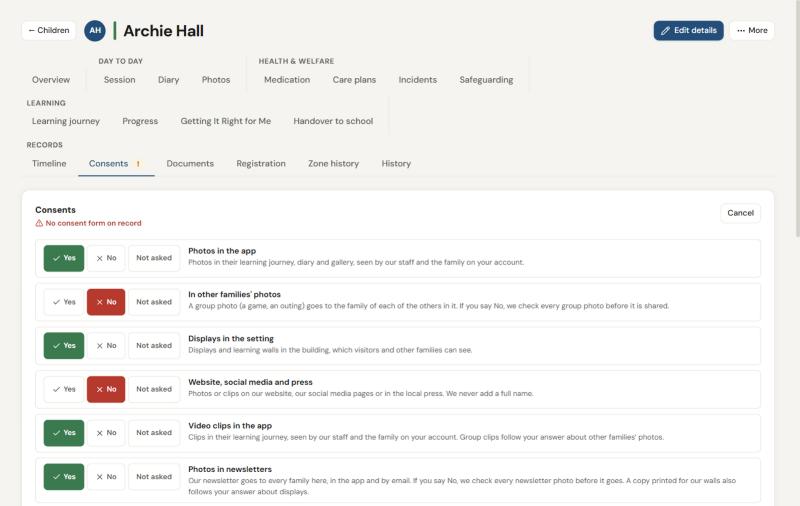
Photos are where families feel most strongly, and where most settings ask too little. One “photo consent” tick doesn’t tell you which uses a family agreed to. Ask about each use separately:
- photos in the app, for the child’s own family;
- appearing in other families’ photos, such as a group photo;
- displays in the setting, which visitors and other families see;
- your website and social media;
- the local press;
- newsletters that go to every family.
UK GDPR says consent must be a clear, specific choice, and as easy to withdraw as to give. Record who answered, and when. Ask families to check their answers each year, and make it easy to change them at any time. If a family says no to group photos, check every group photo before it is shared.
Some children must never appear in public photos, whatever a form says: a looked-after child, a child who has been adopted, a child protected by a court order, or a family who has moved away from domestic abuse. A photo online can show where a child is. Talk to the parent and, where there is one, the child’s social worker.
Separated parents can both have parental responsibility. If one says yes and the other says no, many settings follow the more cautious answer until the parents agree. Write your approach into your policy.
Photos are taken on the setting’s own devices, never on staff’s personal phones. In England, the EYFS says your safeguarding policy must cover the use of mobile phones, cameras and other devices that take and share images. Check what your own framework and regulator expect.
What to do: Replace a single photo question with one question per use. Agree a rule for personal phones, including for visitors and parents at events, and put it in your safeguarding policy. Brief every member of staff on which children must not appear in shared or public photos.
5. Secure your devices, logins and software
Most breaches start with an ordinary device or an ordinary login.
- Everyone has their own login. No shared accounts, even on the room tablet. Then you know who did what, and can end one person’s access without changing everyone’s.
- Lock every screen. Every tablet, phone and laptop has a passcode and locks itself after a short time.
- Use strong passwords, a different one for each system, and a password manager if you can. Never on a sticky note.
- Offer two-step verification to everyone, and encourage it for managers and anyone who sees finance or safeguarding records.
- End access the day someone leaves.
- Check every email before you send it. Check the address, and the attachment. Use BCC for messages to a group of families.
- Report a lost or stolen device straight away. It may be a breach (see section 9).
The software you use holds your records for you. In UK GDPR terms, you are the controller and the supplier is your processor. The law says you need a written contract with them, usually called a data processing agreement. Before you choose a supplier, ask:
- where is our data stored, and if any of it leaves the UK, what safeguards apply;
- who else do you use to process it (your sub-processors);
- how does your support team get into our records? Look for access only with your permission, time-limited and logged;
- what is logged, and can we see who looked at or changed a record;
- how do we get all our data back if we leave, and how is it deleted?
What to do: Walk round your setting and check every device has a screen lock and every person has their own login. List your software suppliers, and check you have a data processing agreement with each one.
6. Share safely, and share when a child needs protecting
Settings share information all the time: with a child’s next school, with the local authority for funding, with health visitors, speech and language therapists and other professionals. Sharing is often right. Do it carefully:
- share what is needed for the purpose, not the whole file;
- make sure your privacy notice tells families about routine sharing;
- send it securely, to the right person. Check the address, and use a secure portal or encrypted email for sensitive records;
- check who is asking. If someone phones asking about a child, call them back on a number you know is theirs;
- record what you shared, with whom, when and why.
Safeguarding is different. The ICO says data protection law doesn’t stop you sharing information to keep a child safe. When you are worried about a child, follow your safeguarding procedures and share the concern with the right people. You don’t always need the family’s consent, and sometimes asking would put the child at more risk. Each nation sets out how to share:
- England: Working Together to Safeguard Children, and your local safeguarding partners’ procedures;
- Scotland: the National Guidance for Child Protection in Scotland;
- Wales: the Wales Safeguarding Procedures;
- Northern Ireland: Co-operating to Safeguard Children and Young People in Northern Ireland.
Record what you shared and why, as you would any safeguarding decision.
What to do: Make sure every member of staff knows that a safeguarding concern is always passed on, and to whom. Write down which routine sharing you do, check it is in your privacy notice, and agree a secure way to send sensitive records.
7. Answer requests for information within a month
Anyone can ask for a copy of the personal data you hold about them. This is a subject access request. It can be made by email, by letter, on the phone or at the door, to any member of staff. It doesn’t need a form, and it doesn’t need to use the words “subject access”.
You usually have one month to respond. If a request is complex, or someone makes several, you may be able to extend this by up to two more months, as long as you tell them within the first month. In most cases you can’t charge.
A young child can’t make a request themselves, so a parent with parental responsibility can usually ask on their behalf. In England, the EYFS says parents should be given access to all records about their child, unless an exemption under the Data Protection Act 2018 applies.
Before you send anything:
- check who is asking. Confirm the person is who they say they are, and has parental responsibility;
- take out other people’s information, such as the other parent’s address or another child in a note or a photo, unless they agree or it is reasonable to include it;
- take advice before you release safeguarding records. Some information can be withheld, for example where giving it would be likely to cause serious harm. Ask your local authority’s safeguarding team or a solicitor;
- check for court orders. Separated parents can both have parental responsibility, and both can usually ask. A court order may limit what one parent can see.
People also have the right to have wrong information corrected, and in some cases deleted. Records the law says you must keep usually stay.
What to do: Teach every member of staff to recognise a request and pass it to the manager the same day. Keep a log of requests: who asked, when, the date it is due and what you sent.
8. Keep records only as long as you need them
UK GDPR says you must not keep personal data for longer than you need it. That needs a written retention schedule: each kind of record, how long you keep it, why, and who deletes it.
There isn’t one list that sets every period for every setting. Your framework and regulator expect some records to be kept. Some, such as accident and incident records, safeguarding records and medication records, are often kept for many years, because questions can come long after a child has left. Others, such as the details of a family who joined the waiting list and never started, or an unsuccessful job applicant, should go much sooner.
Ask your insurer what they expect. Check your framework, your regulator’s guidance and any guidance from your local authority or a sector body. Write the reason beside each period.
When the time comes:
- delete records everywhere they are: the app, email, shared drives, spreadsheets and paper;
- shred paper securely;
- keep a note of what was deleted, and when;
- don’t delete anything that is part of a complaint, a claim or an investigation, even if its period has passed.
What to do: Write your schedule this term, starting with the records you hold most of. Set a date each term to delete what is due, and record that you did.
9. Know what to do when something goes wrong
A personal data breach is any breach of security that leads to personal data being lost, destroyed, changed, disclosed or accessed without permission. Most are ordinary:
- an email or a photo sent to the wrong family;
- a tablet or a phone lost without a screen lock;
- a child’s photo shared publicly without consent;
- paper records lost or left where others could read them;
- someone using another person’s login.
When it happens:
- Contain it. Ask the wrong recipient to delete the email, take the post down, change the password.
- Work out the risk. What information was it, about whom, and what could happen to them?
- Report it to the ICO within 72 hours of becoming aware of it, if it is likely to put people’s rights and freedoms at risk. If you aren’t sure, the ICO has a self-assessment, and you can report what you know and add more later.
- Tell the families affected without undue delay if the risk to them is high, so they can protect themselves. Say what happened, what you have done and who to contact.
- Check whether your childcare regulator expects to be told, especially if a child’s safety could be affected.
- Record every breach, even the ones you don’t report: what happened, what you did and why you did or didn’t report it.
Then ask why it happened, and change the system so the same slip can’t happen the same way.
What to do: Write these steps on one page and tell every member of staff to report a breach, or a near miss, to the manager straight away. A breach found early is easier to put right. Make it safe to own up.